APU2 PCEngines
June 5, 2026 - Reading time: 5 minutes
Putty:
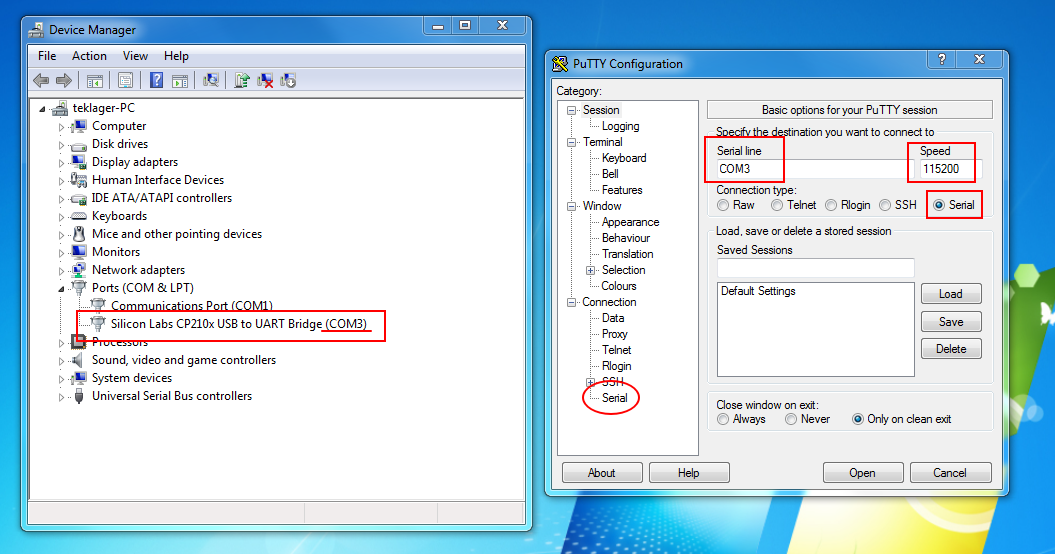
Settings for the APU2 Serial connection:
- 115200 baud
- 8 data bits
- no parity
- 1 stop bit (115200 8N1)
GRUB:
For Ubuntu Linux Server installation, these boot parameters need to be added to the GRUB command line.
console=tty0 console=ttyS0,115200n8In the GRUB boot menu, select the Try or Install Ubuntu menu entry, and press the E key to edit it.
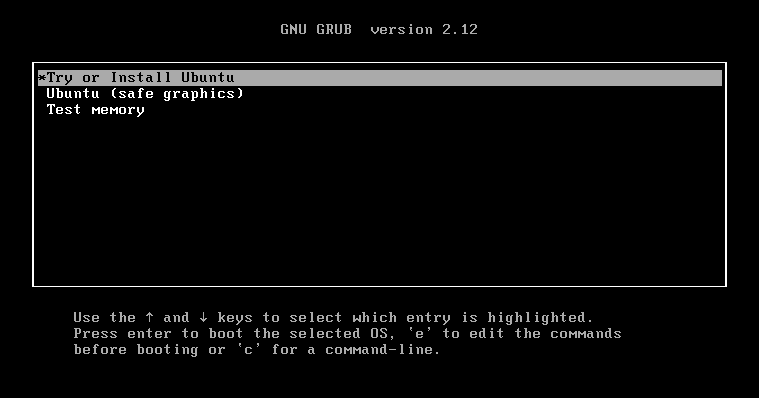
These parameters need to be added at the end of the line starting with the word linux in the edit screen after pressing E.
For example Replace this line (it could be a little different):
linux /casper/vmlinuz --- quietwith this line:
linux /casper/vmlinuz --- quiet console=tty0 console=ttyS0,115200n8Then press F10 to continue to boot the installation media, and follow the installer instructions.
Installation can be slow compared to bare metal modern computer.
At next reboot the serial console will be the output of the newly installed system.
For other Linux distribution with GRUB, the process should be similar.
Some specialized distributions like OPNSense or PfSense have images ready to install and already configured for serial output (download the appropriate ISO they provide for serial).
BIOS:
To enter BIOS press F10 during startup. Useful after flashing the BIOS to rearrange boot order and other settings.
Mainline (and legacy) BIOS available at https://pcengines.github.io/
It is possible to flash BIOS from within a running system, see https://pcengines.github.io/apu2-documentation/firmware_flashing/
Example for a BSD type system (OPNSense, etc), download a bios file:
fetch https://3mdeb.com/open-source-firmware/pcengines/apu2/apu2_v4.17.0.3.romInstall flashrom and flash the file with the command:
pkg install -y flashrom
flashrom -w apu2_v4.17.0.3.rom -p internal:boardmismatch=force -c W25Q64BV/W25Q64CV/W25Q64FV
Shutdown when flashing is complete, then power it back on and hope flashing was OK, and the APU is not bricked.
If flashing doesn't work, make sure BIOS write protect isn't enabled in BIOS settings.
Resources:
https://www.pcengines.ch/support.htm
https://teklager.se/en/knowledge-base/
https://medium.com/search?q=apu2